Wordflux on Your Desktop, Phone, and Tablet
Install Wordflux directly from your browser in under 3 seconds. Enjoy instant dock and home screen launch, native file drag-and-drop, and distraction-free standalone windows without heavy app store downloads.
Ready to install Wordflux on this device?
No heavy app store setup required. Pin Wordflux to your dock, taskbar, or home screen in seconds.
Select Your Operating System or Browser
macOS & Windows (Chrome)
Install directly via Google Chrome on macOS, Windows 11/10, or Linux in 1 click.
Click the Install Icon in the URL Bar
Look for the computer download icon on the far right of Chrome's address bar (or click the 3 dots menu > Cast, save, and share > Install Wordflux).
Confirm the Installation
Click Install in the browser confirmation prompt. Wordflux opens immediately in its own clean, distraction-free desktop window.
Pin to Dock or Taskbar
Right-click the Wordflux icon in your macOS Dock or Windows Taskbar and select Keep in Dock or Pin to taskbar for 1-click launching anytime.
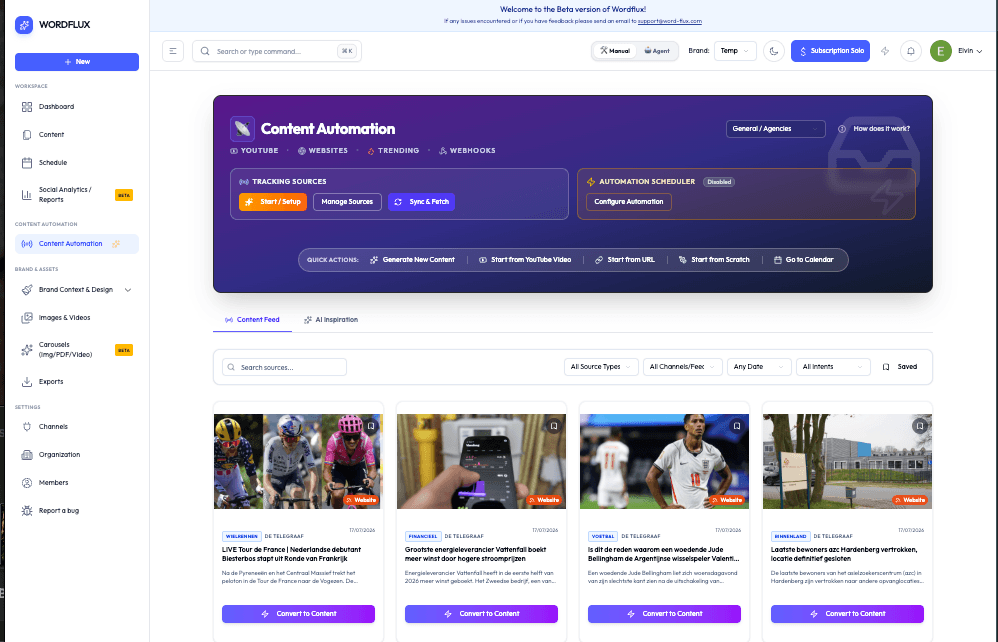
Clean Standalone Windows on Desktop and Mobile
No browser tabs. No address bar clutter. Wordflux runs in an independent operating system window optimized for fast keyboard shortcuts and multi-window productivity.

Why an Installable PWA is Superior to Legacy App Store Downloads
Traditional desktop installers and mobile app stores add unnecessary friction, slow down updates, and consume gigabytes of storage. Here is how Wordflux delivers a better experience.
| Dimension | Wordflux Progressive Web App (PWA) | Legacy App Store Binaries (.DMG / .EXE / .APK) |
|---|---|---|
| Installation Speed | Instant 1-click install (under 3 seconds) | Requires searching store, entering passwords, and waiting for 200MB+ downloads |
| Disk Storage Footprint | Lightweight browser cache footprint (under 10MB total) | Heavy binary installers and Electron bundles consuming 300MB to 1GB of storage |
| Feature Updates | Continuous silent updates via service workers; always current | Frequent manual update prompts, store review delays, and broken dependencies |
| Cross-Device Parity | 100% identical feature set across macOS, Windows, iOS, and Android | Stripped-down mobile companion apps missing core desktop capabilities |
| System File Sharing | Native launchQueue file handling and Web Share Target integration | Complex file system permissions and isolated sandboxes |
Engineered with Native System Capabilities
Wordflux utilizes cutting-edge W3C modern web platform APIs to bridge the gap between web agility and native operating system integration.
Native OS File Handling API
Drag and drop Wordflux project files (.flux, .wfx), documents, PDFs, or raw image and video assets directly into your running app window. The app parses files locally via launchQueue and feeds them straight into Magic Input.
Drag and drop or right-click 'Open With Wordflux' in macOS Finder or Windows Explorer.
System-Wide Web Share Target API
Share articles, newsletter snippets, and photos directly into Wordflux from Safari, Chrome, Reddit, Notes, or any mobile app share sheet. Wordflux receives the URL, title, and media to generate instant multi-platform campaigns.
Tap Share in your mobile browser and pick Wordflux to repurpose any page in seconds.
Distraction-Free Standalone Window
Wordflux runs in its own dedicated, borderless desktop window without browser tabs, bookmarks bars, or search input clutter. It integrates cleanly with macOS Mission Control spaces and Windows 11 snap layouts.
Feels and acts like a premium native desktop application without the bloat.
Automatic Instant Background Updates
Never wait for 200MB installer downloads or manual App Store updates again. Service workers automatically refresh and hydrate the application in the background whenever new AI models and features roll out.
You always have the freshest platform capabilities on every launch.
Dock & Home Screen Quick Action Shortcuts
Right-click the Wordflux icon in your macOS Dock or Windows Taskbar, or long-press on iOS/Android to access instant jump shortcuts: AI Assistant Chat, Generate Content, and Content Calendar.
Jump directly to your top content workflows in a single click.
Strict Browser Sandbox & GDPR Security
Installed PWAs operate under strict browser security sandbox constraints. You receive enterprise-grade AES-256 encryption, zero-data AI training policies, and complete immunity to binary installer malware.
Certified GDPR and EU privacy compliance with zero local device tampering.
Everything You Need to Know About Wordflux Web App Installation
Clear answers regarding Progressive Web App installation, security, updates, and cross-platform capabilities.
Why is Wordflux delivered as a Progressive Web App (PWA) rather than a legacy app store download?
Why does clicking 'Desktop & Mobile Web App' open this guide instead of automatically downloading an installer file?
How do I install Wordflux on macOS or Windows using Google Chrome or Microsoft Edge?
How do I install Wordflux on an iPhone or iPad using Safari?
How do I install Wordflux on Android using Google Chrome?
What is the Native File Handling API and how do I use it on desktop?
How does the Web Share Target API work on mobile devices?
Does the installed desktop and mobile app have full feature parity with the web dashboard?
How much disk storage space does the Wordflux PWA use?
Do I need to manually update the app when new features are released?
Is installing the Wordflux Desktop & Mobile Web App free?
Install Wordflux on Your Devices Today
Combine the standalone Desktop & Mobile Web App with our Chrome & Edge browser extension to automate your social campaigns, carousels, and CMS articles from anywhere.