Wordflux Browser Plugin: Instant Web & YouTube to Socials, Auto-Matched to Your Sources
Use the plugin right out of the box with zero configuration to turn any webpage or YouTube video into multi-platform social posts and CMS articles. Or unlock its full power by configuring your Content Automation Sources and Context Profiles so the plugin automatically recognizes your websites and generates on-brand campaigns in 1 click.
Start Immediately With Zero Config, Then Scale With Automated Source & Context Matching
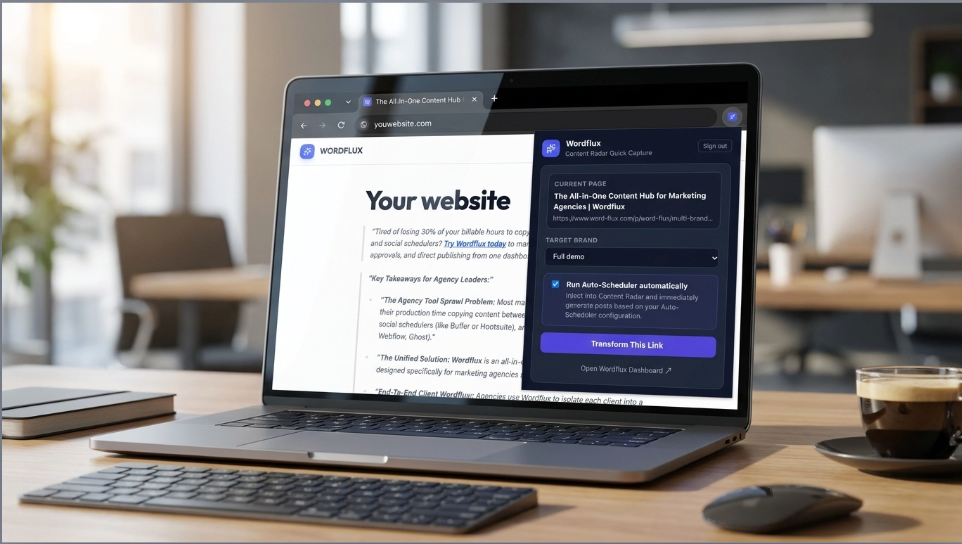
The Wordflux Browser Plugin is designed with a two-tier architecture. Right out of the box, you can install the extension, sign in with one click, and immediately capture any webpage, highlighted quote, or YouTube video to generate social media posts and CMS articles without configuring anything. To get the highest value and speed, configure your websites in Content Automation Sources and set up your Context Profiles in the Wordflux web app. When you browse a configured website, the plugin automatically recognizes the domain, matches your saved extraction rules, CSS selectors, visual templates, and Context Profile, and lets you generate tailored campaigns right away in 1 click. As a secondary everyday helper, it also includes an in-page AI Writing Assistant & Grammar Fixer for any text box on the web.
Use It Out of the Box, or Configure Once for 1-Click Perfection
You never hit a setup wall with the Wordflux plugin. Start generating content the second you install it, and layer in Context Profiles and Content Automation Sources when you want hands-free precision.
1. Zero-Configuration Mode (Out of the Box)
Just installed the plugin? You do not need to configure a single feed, CSS selector, or profile before using it. Open any article or video on the web and generate content right away:
- Intelligent Full-Page Heuristics: Automatically strips menus, ads, and footers from any article using
Full Page: AI Repurposemode. - Automatic Smart Image Filtering: Extracts high-resolution article images while automatically ignoring tiny icons, author avatars, and images smaller than 150px.
- On-the-Fly Picker & Quotes: Highlight any quote on a page or click Click Section on Webpage to grab specific DOM elements visually.
- Instant YouTube & Grammar Support: Convert YouTube videos via transcripts and fix grammar in any web input box with zero setup.
2. Configured Superpower Mode (Sources + Context Profiles)
To get the most value out of the plugin on your own websites, e-commerce catalogs, job boards, or regular news sources, configure Content Automation Sources and Context Profiles once in Wordflux:
- Automatic Website Recognition (
✓ Configured Source): When you open the plugin on a configured website, it immediately matches the domain and URL path filter (like/blog/or/products/). - Preloaded Reading Modes & CSS Selectors: Automatically applies your saved Reading Mode, target CSS content selectors, and exclude selectors so only the exact data you want is extracted.
- Context Profile Grounding: Automatically injects your linked Context Profile (business facts, product positioning, PDFs, and tone rules) into every generation.
- True 1-Click Generation: Because the plugin already knows how to read the site and which Context Profile and visual template to apply, you just click Generate Content and your campaign is built.
How Content Automation Sources, Context Profiles & the Plugin Connect
Configure your websites and business knowledge once in the Wordflux dashboard. Whenever you browse those websites in Chrome or Edge, the plugin connects the dots automatically.
Configure Your Websites in Content Automation Sources
In Content Automation (/app/radar), add the websites you own or frequently repurpose from. Even if a site has no feed, click Save as Extension-Only Source.
- Reading Mode: Choose how text is extracted (Full Page AI, Page Section, Exact 1-on-1, or Summary Expansion).
- CSS Selectors: Define exact HTML elements to include (e.g.,
article.post-body) and exclude (e.g.,.related-links). - URL Path Filter: Scope rules to specific sections like
/blog/,/vacatures/, or/products/. - Image Rules: Toggle Main image only so only the primary hero photo is used.
Build Context Profiles for Deep Business Knowledge
In Brand Voices & Context Profiles (/app/brand-voices?tab=context), train Wordflux on who you are so generated content never sounds like generic AI.
- Company & Offer Facts: Store your value proposition, pricing facts, target ICP, and calls to action.
- Uploaded Knowledge Sources: Attach up to 5 PDFs, whitepapers, or brand guidelines per profile.
- Do's, Don'ts & Terminology: Enforce industry vocabulary and ban robotic AI cliches.
- Link to Sources or Brands: Assign a Context Profile to a specific Content Automation Source or set it as your Brand Default.
Open the Plugin on Your Site & Generate Right Away
When you browse any page on a configured website and click the Wordflux icon, the plugin automatically matches the URL to your saved source configuration:
- Green
✓ Configured SourceBadge: Confirms the exact matched source name and active Reading Mode. - Zero Dropdown Clutter: Hides manual reading mode, context profile, and template selectors because your saved rules are already locked in.
- Multi-Source Path Disambiguation: Have separate rules for
/blog/and/jobs/? The plugin matches the right path or lets you switch in 1 click. - Flexible Override Anytime: Click Customize reading mode & settings if you ever want to tweak settings for a single page.
Everything the Plugin Can Capture & Generate While You Browse
Whether you are on your own website, an industry news article, an e-commerce product page, or a YouTube video, the Wordflux plugin gives you total control over what gets extracted and where it publishes.
1-Click Multi-Platform Social & CMS Generation
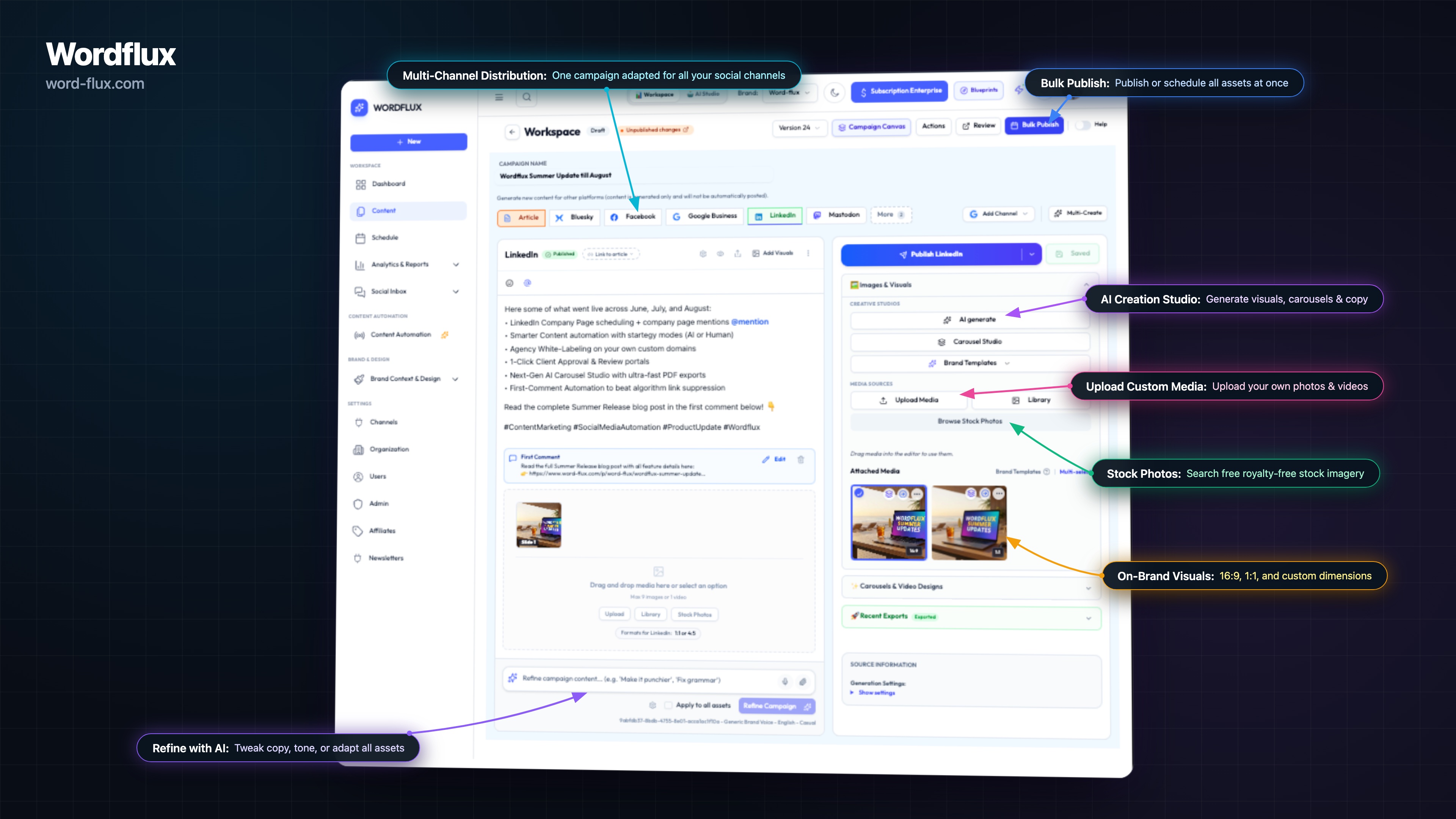
Click Generate Content and Wordflux reads the page and drafts platform-native posts for all channels configured in your Auto-Scheduler (LinkedIn, X, Instagram, Facebook, Threads, Google Business, Pinterest, WordPress, Webflow, or Ghost). Wait right in the popup for a direct Preview & Edit Post link or receive a browser notification when ready.
Automatic YouTube Video & Shorts Detection
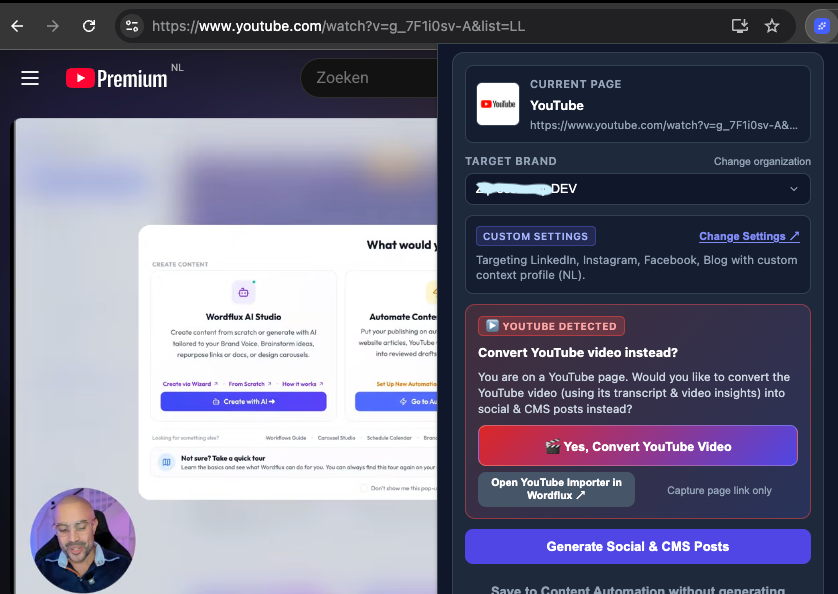
Open any YouTube video or YouTube Short and the popup automatically shows a YouTube Detected prompt. Click Yes, Convert YouTube Video to extract the full spoken transcript and video insights into social threads, LinkedIn PDF carousels, and SEO blog articles, or jump into the prefilled YouTube Importer.
Interactive Visual Section Picker & Quotes
Want to convert only specific blocks on a busy webpage? Choose a Page Section reading mode and click Click Section on Webpage. Hover and click any element on the live page to add multiple text snippets with their exact CSS selectors, or highlight a quote before opening the popup.
Smart Media Strip & Visual Brand Templates
The plugin automatically extracts images from the page, filters out avatars and icons under 150px, and deduplicates retina srcset files. Remove unwanted images in 1 click, toggle Main image only, and style extracted photos with your custom Brand Visual Templates (Photo Card, Quote Card, Editorial, Wave Split).
Add to Existing Campaign or Bookmark to Feed
Building a multi-post campaign from several articles? Use the + Add to existing campaign search dropdown in the plugin to append new posts directly into an active campaign. Or click Save to Content Automation without generating to bookmark the link into your feed for later.
Live Browser DOM Capture & Multi-Brand Switcher
Because extraction happens right inside your active browser tab on click, the plugin cleanly captures dynamic JavaScript pages, cookie-gated sites, and logged-in portals that server crawlers cannot reach. Managing multiple clients? Switch between Organizations and Brands directly in the popup header.
6 Content Reading Modes: Pre-Configure per Website or Pick on the Fly
Every website is structured differently. Save your preferred Reading Mode on any Content Automation Source so the plugin selects it automatically, or choose a mode manually when browsing an unconfigured site.
ai_full_contentFull Page: AI Repurpose
Extracts the clean article body using intelligent DOM heuristics, strips navigation clutter, and crafts original multi-channel social posts and SEO articles.
css_selectorPage Section: Exact Text + AI Rules
Targets specific CSS selectors or clicked page sections, preserves the core facts verbatim, and formats the output according to your brand and platform rules.
css_selector_aiPage Section: AI Repurpose
Extracts only the targeted CSS selector or highlighted page elements and transforms those specific insights into fresh social hooks, threads, and carousels.
raw_full_contentFull Page: Exact Copy (1-on-1)
Extracts the full page text exactly as written without AI rewriting, keeping your original copy intact for cross-posting or syndication.
css_selector_rawPage Section: Exact Copy (1-on-1)
Extracts only the selected DOM element or CSS selector verbatim without AI rewriting.
ai_summaryShort Description: AI Expansion
Reads a concise summary, meta description, or short product blurb and expands it into a complete multi-platform social campaign using your Context Profile.
Plus: In-Page Grammar Fix & AI Writing Assistant Across the Web
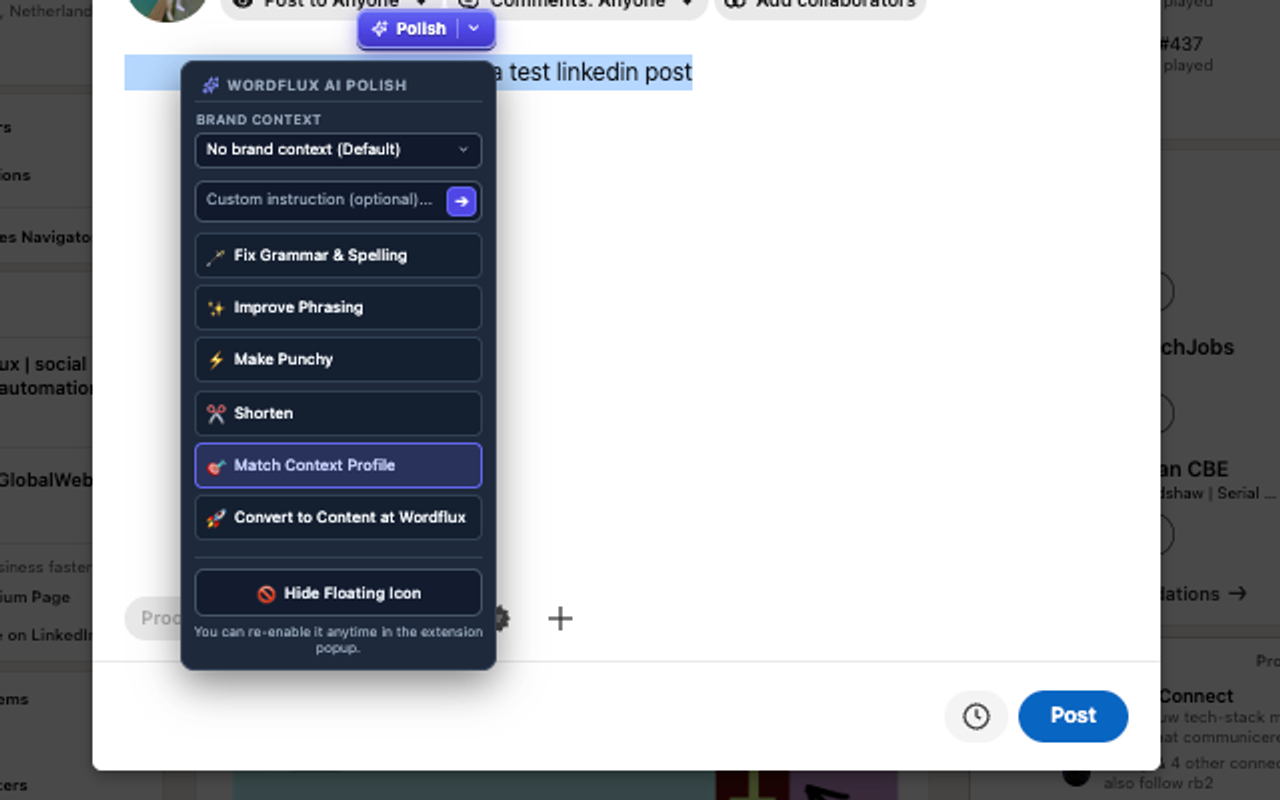
While 1-click content repurposing is the primary engine of the Wordflux plugin, we also included a lightweight AI Writing Assistant right inside the second tab of the extension.
Whenever you are typing a post, comment, email, or article inside LinkedIn, X, Gmail, WordPress, Webflow, or any web text box, you can fix grammar, sharpen your hook, or rewrite draft text in your Brand Context Profile without switching tabs.
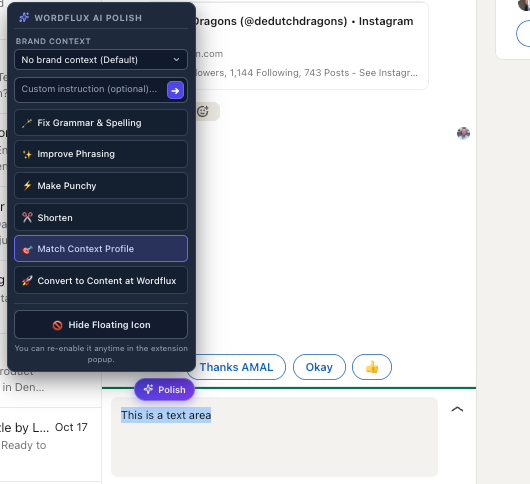
3 Ways to Trigger In-Page Polish
Fix Grammar & Spelling
Corrects typos, punctuation, and grammatical mistakes instantly inside any text box while keeping your original meaning intact.
Improve Writing & Flow
Smooths out awkward phrasing, sharpens sentence structure, and elevates readability for professional emails, comments, and articles.
Make Copy Punchy
Removes filler words and turns flat sentences into high-converting social hooks for LinkedIn, X, and Threads.
Shorten & Condense
Trims wordy paragraphs down to crisp, platform-ready character counts without losing key takeaways.
Match Context Profile
Rewrites your draft using your active Brand Context Profile, enforcing your terminology, tone rules, and forbidden words list.
Custom Prompt & Convert to Campaign
Run any custom instruction on highlighted text or send your polished draft directly into the Wordflux Content Wizard to build a full campaign.
How to Get Started in Under 3 Minutes
Follow these four steps to go from installing the extension to generating fully matched, context-grounded campaigns from your websites in 1 click.
Install & Sign In With 1 Click
Click Add to Chrome (works on Chrome, Microsoft Edge, Brave, and Arc), pin the puzzle icon to your browser toolbar, and click Sign in with Wordflux. The extension automatically links your active workspace, organizations, and brands without copying API keys. Choose your default opening tab (Repurpose Content or AI Writing Assistant).
Test Zero-Config Capture on Any Webpage or Video
Open any public blog article, industry news story, or YouTube video and click the Wordflux icon. Even before configuring any sources, you can click Generate Content right away to see how Wordflux extracts the page and creates ready-to-publish social posts.
Configure Your Context Profiles
Open Brand Voices & Context Profiles in Wordflux. Add your business description, target audience, tone rules, and up to 5 Knowledge Source documents. Set your main profile as your Brand Default so both content repurposing and in-page text polishing know your business inside out.
Add Your Websites to Content Automation Sources
Open Content Automation to add your website URL and configure your Reading Mode, CSS selectors, URL filter, and Context Profile. From that moment on, visiting your website lights up the ✓ Configured Source badge for instant 1-click generation.
Out-of-the-Box Mode vs. Configured Source & Context Mode
See exactly what works immediately upon installation and what gets automated when you configure your Content Automation Sources and Context Profiles.
| Plugin Capability | Out-of-the-Box (Zero Config) | With Configured Source + Context Profile |
|---|---|---|
| 1-Click Webpage & Article Capture | Yes, uses smart full-page DOM heuristics | Auto-matches your exact saved Reading Mode & CSS selectors |
| URL Path & Domain Recognition | Treats every page as a general article | Recognizes domain & URL path filters (e.g. /blog/, /jobs/, /shop/) automatically |
| Business Context & Knowledge Grounding | Uses page text directly (or manual profile selection) | Automatically applies your linked Context Profile & uploaded PDFs |
| Image Extraction & Visual Templates | Extracts page images (>150px) with manual template picker | Enforces saved Main Image Only rule & default Brand Visual Template |
| YouTube Video & Shorts Transcript Conversion | Yes, automatic video detection & 1-click transcript capture | Combines video transcript with your Brand Voice & Auto-Scheduler channels |
| In-Page Grammar & Writing Assistant | Yes, instant grammar, clarity, punchy & shorten actions | Unlocks 1-click Match Context Profile rewriting with your brand terminology |
Capture Anywhere in Chrome or Edge, Publish to 11+ Socials & Your CMS
Every webpage, quote, or YouTube video you capture with the browser plugin flows directly into Wordflux's verified publishing pipeline:
Privacy-First Manifest V3 Architecture
Unlike invasive browser scrapers or social automation bots that risk your accounts, the Wordflux Browser Plugin is built strictly on user-initiated permissions:
- On-Click Access Only (
activeTab): The extension only reads page content when you explicitly click the toolbar icon, context menu, or shortcut. - Zero Browsing History Tracking: We never monitor your background tabs, collect web history, or sell user data.
- 100% Official Platform Publishing: All social and CMS publishing happens server-side via official OAuth APIs (Google, Meta, LinkedIn, X, WordPress), keeping your accounts 100% safe.
Frequently Asked Questions About the Chrome & Edge Plugin
Detailed answers on zero-config usage, Content Automation Source matching, Context Profiles, YouTube conversion, and the in-page writing assistant.
Can I use the Wordflux Chrome and Edge plugin right out of the box without configuring anything?
Yes. As soon as you install the plugin and click Sign in with Wordflux, it works immediately with zero configuration. You can open any webpage, blog article, or YouTube video, click Generate Content, and the plugin will automatically extract the clean article text, filter out small icons or avatars under 150px, and generate social posts using intelligent default settings. You can also use the in-page grammar and writing assistant right away.
Why is it better to configure Context Profiles and Content Automation Sources in Wordflux?
While zero-config mode is great for ad-hoc browsing, configuring your Context Profiles and Content Automation Sources unlocks the plugin's full power. When you configure your own websites or favorite industry sources in Content Automation and attach a Context Profile, the plugin recognizes those domains automatically whenever you visit them. Instead of manually selecting reading modes, CSS selectors, image rules, or background context on every visit, the plugin applies your exact rules automatically so you can generate on-brand campaigns in a single click.
How does automatic website and Content Automation Source matching work?
Every time you open the Wordflux plugin on a webpage, it checks the current tab URL against your workspace's Content Automation Sources. If the domain and URL path filter (such as /blog/, /news/, or /jobs/) match a configured source, the plugin displays a green Configured Source badge. It automatically loads that source's Reading Mode, CSS content and exclude selectors, Main Image Only preference, Brand Visual Template, and linked Context Profile. If a domain has multiple configurations, you can pick between them or click Customize reading mode and settings for a one-off override.
Can I configure a website for the plugin even if that website does not have an automated feed?
Yes. When adding a website in Wordflux Content Automation, you can save any domain as an Extension-Only Source (Browser Capture mode). This allows you to pre-configure reading modes, CSS selectors, URL filters, and Context Profiles for any custom website, e-commerce store, job portal, or internal dashboard so the browser plugin matches it automatically whenever you browse.
What is a Context Profile and how does it improve content generated from the plugin?
A Context Profile stores your company's core knowledge, product positioning, target audience personas, tone guidelines, forbidden AI cliches, and uploaded Knowledge Sources (such as PDFs or brand docs). When generating content from a webpage or YouTube video via the plugin, your Context Profile grounds the AI so it interprets the page through your business lens rather than producing generic summaries. It also powers the Match Context Profile action in the in-page writing assistant.
How do I select only a specific section or quote on a webpage instead of the full page?
You have two easy ways to capture specific sections. First, you can highlight any text quote on the webpage before clicking the plugin icon (or right-click and choose Transform with Wordflux). Second, inside the plugin popup, you can switch to a Page Section reading mode and click the Click Section on Webpage button. This activates an interactive visual element picker that lets you click one or more sections directly on the page, capturing both their text and exact CSS selectors.
How does YouTube video and YouTube Shorts repurposing work in the plugin?
When you browse to any YouTube video or YouTube Short, the Wordflux plugin automatically detects the video and displays a YouTube Detected banner. With one click on Yes, Convert YouTube Video, Wordflux extracts the video transcript, key arguments, and high-resolution thumbnail to generate LinkedIn carousels, X threads, social posts, and SEO blog articles, or lets you open the prefilled YouTube Importer in your dashboard.
How does the secondary grammar fix and in-page AI Writing Assistant work?
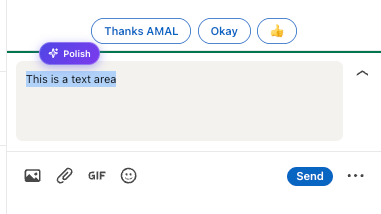
Alongside content repurposing, the plugin includes a built-in AI Writing Assistant that works inside any text input, textarea, or rich-text editor on the web (including LinkedIn, X, Gmail, WordPress, Webflow, and Notion). Highlight text and click the floating Polish badge, right-click selected text, or press Cmd+Shift+E (Mac) or Alt+Shift+E (Windows) to fix grammar and spelling, improve flow, make copy punchy, shorten text, or rewrite in your Brand Context Profile. You can undo any replacement in 1 click or disable floating helpers on specific sites anytime.
Which browsers and Wordflux subscription plans support the browser plugin?
The Wordflux Browser Plugin is built on Manifest V3 and works natively in Google Chrome, Microsoft Edge, Brave, Arc, Opera, and Vivaldi. Installing the plugin is 100% free. All features (both Content Repurposing and the AI Writing Assistant) are included during your 14-day free trial after completing initial brand onboarding. After the trial, the Solo Basic plan (€10/mo) supports the AI Writing Assistant and manual source saves, while Solo Autopilot (€29/mo), Growth, and Agency unlock full 1-click Auto-Scheduler campaign generation.
Does the Wordflux plugin track my browsing history or read pages in the background?
Never. Wordflux strictly complies with the Chrome Web Store Limited Use policy and GDPR privacy standards. The extension only accesses webpage content, YouTube metadata, or selected text when you explicitly trigger it by clicking the Wordflux toolbar icon, using the right-click context menu, or pressing the keyboard shortcut. Your browsing history is never tracked, stored, or sold.
Install the Wordflux Plugin & Turn Any Webpage into a Campaign
Use it immediately out of the box on Chrome, Edge, Brave, or Arc, and connect your Context Profiles and Content Automation Sources for automatic 1-click website matching.