Publish to WordPress, Ghost and Webflow via Wordflux MCP


Publish Directly to CMS Platforms and Webhooks via MCP
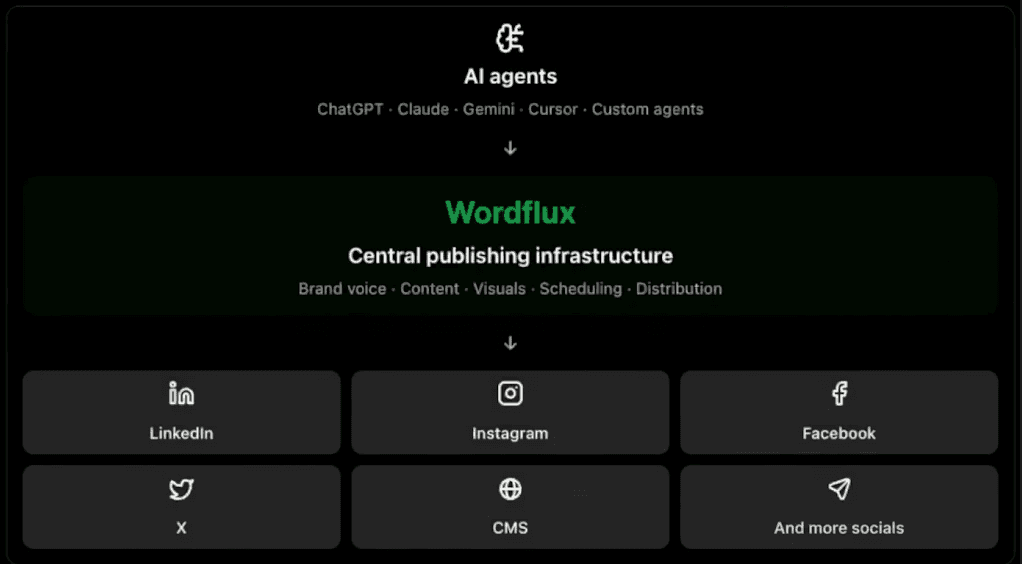
The Wordflux MCP server (https://api.word-flux.com/mcp) lets AI agents write, format, optimize SEO metadata, and publish full articles directly to WordPress, Ghost, Webflow, Shopify Blog, Wordflux Hosted SEO Blog, and Custom Webhooks. Whether you run a headless stack, a Wix site via webhook automation, or a multi-brand WordPress network, your AI client can now manage your entire CMS publishing pipeline end-to-end.
Modern publishing shouldn't require copying HTML into a CMS admin dashboard. Your AI assistant can ship a fully formatted, SEO-ready article (complete with slug, meta description, tags, and a 16:9 hero image) in seconds.
Upgrade your CMS workflow from manual uploads to autonomous publishing. Connect your site to Wordflux at https://www.word-flux.com.
Supported CMS Platforms and Headless Targets
Through the Wordflux MCP server, AI agents can publish and update articles across:
WordPress: Full REST API integration supporting titles, Markdown or HTML bodies, featured 16:9 images, tags, meta descriptions, and in-place updates when revising an existing article.
Ghost: Push clean, structured long-form posts with SEO excerpts, custom slugs, and tags straight to your Ghost publication.
Webflow: Target specific Webflow CMS Collections with mapped fields, slugs, and hero media.
Shopify Blog: Publish commerce-driven SEO guides and product stories directly to your Shopify store blog.
Custom Webhooks: Connect Wix, Next.js, Astro, Notion, or any custom CMS by routing structured JSON payloads (title, slug, meta description, tags, HTML/Markdown, hero image URL) to your webhook endpoint.
Wordflux Hosted Public SEO Blog: Publish immediately with zero external CMS credentials required.
Built-In SEO and GEO Metadata Control for AI Agents
Every CMS article created via the Wordflux MCP server supports structured SEO fields out of the box:
SEO Title: Concise, keyword-focused headline under 60 characters.
URL Slug: Clean, readable slug tailored to your target query.
Meta Description: 150 to 160 character search excerpt for higher click-through rates.
Tags: Targeted topic tags for taxonomy and internal linking.
16:9 Hero Visuals: Dedicated widescreen (1920x1080) hero images generated or attached in place.
Even better, you can bundle your CMS article and all promotional social posts inside a single campaign, keeping your blog post and its LinkedIn, X, Instagram, and Threads distribution synchronized.
Autonomous Agent CMS Auto-Posting Workflow
If you run autonomous AI agents (such as scheduled research bots, Cursor release-note agents, or content pipelines), here is the standard MCP flow:
Authenticate your agent against
https://api.word-flux.com/mcpusing OAuth orWORDFLUX_API_KEY.Fetch Brand Rules automatically so every article obeys your brand's voice, formatting, and CTA requirements.
Create or Update in Place for WordPress, Ghost, Webflow, Shopify, Custom Webhooks, or Hosted Blog without creating duplicate drafts.
Auto-Publish or Queue live immediately, on a schedule, or with a no-login Client Review link for editorial sign-off.
Frequently Asked Questions (FAQ)
Can I update an already-published WordPress article through the Wordflux MCP?
Yes. Revising an existing campaign updates your copy, SEO fields, or images in place without creating duplicate drafts.
How can I publish to Wix or a custom headless CMS?
Use a Custom Webhook destination in Wordflux. Whenever your AI agent creates or publishes an article, Wordflux delivers the structured article payload (including title, slug, meta description, tags, body, and image URLs) straight to your Wix automation or custom API endpoint.
Put your CMS on autopilot. Launch your AI-powered publishing workflow at https://www.word-flux.com.
Join the conversation
"You can now publish straight from Claude, ChatGPT, Gemini, or Cursor to your social channels and CMS with Wordflux. Here's how it works in practice: say you're editing a doc. You highlight a section ..."
More from this series
Explore related content published from the same campaign