WordFlux Chat AI (Coming Soon)

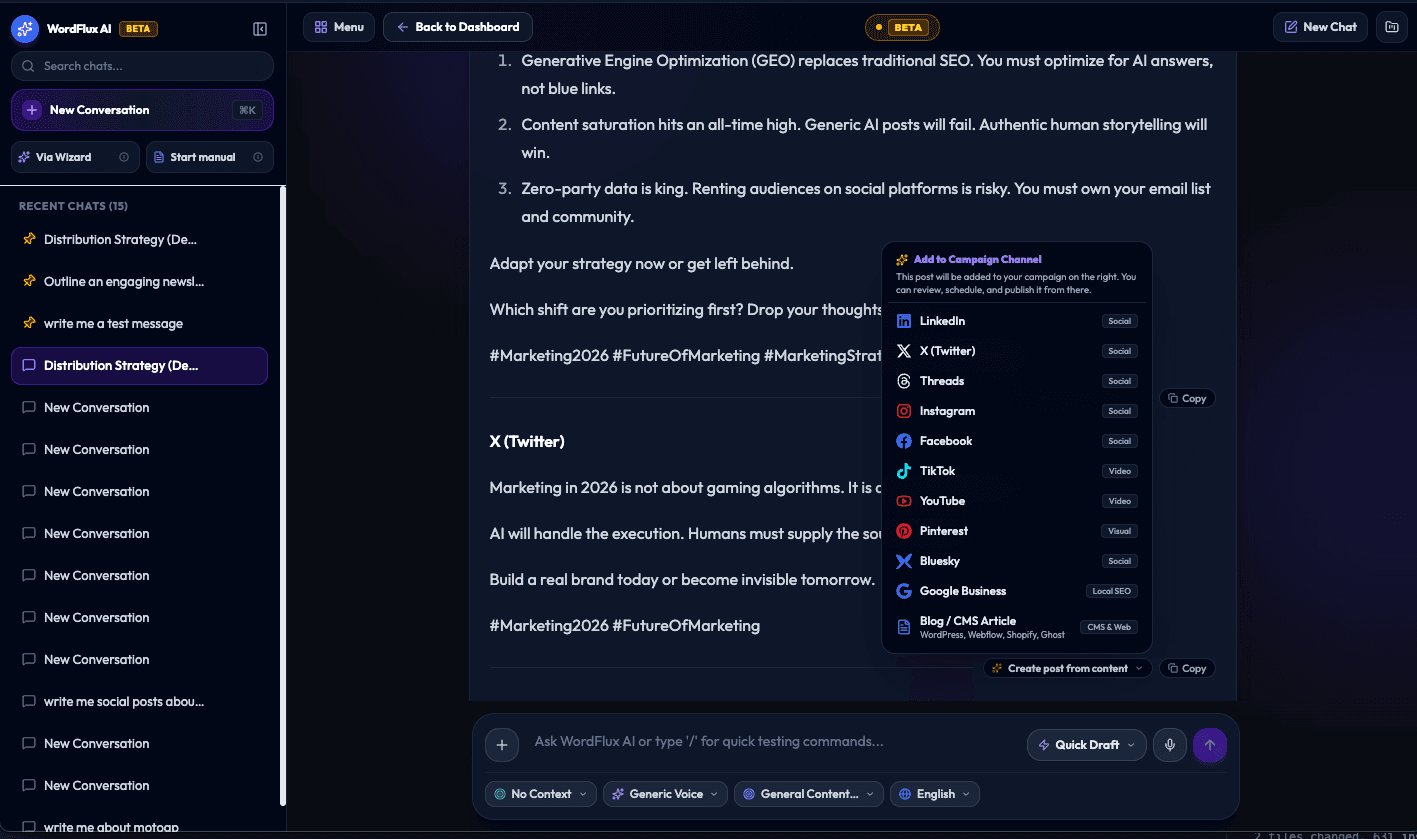
Stop the Copy-Paste Chaos: Introducing WordFlux AI Chat for Social Media and CMS (Beta Coming Soon)
Summary: General-purpose chatbots like ChatGPT, Claude, and Gemini are great at conversation, but inefficient for publishing workflows. In the upcoming days, we are launching the beta of WordFlux AI Chat: a conversational AI engine designed specifically to turn free-flowing chats into ready-to-publish social media campaigns, SEO articles, and direct-to-CMS drafts with zero copy-pasting.
The Copy-Paste Problem with Generalist AI
When you use ChatGPT, Claude, or Gemini to create marketing content, you usually follow the same repetitive routine:
Prompt the AI: Spend time explaining your brand voice, tone, and formatting rules.
Copy the Output: Highlight the response and copy it to your clipboard.
Open Multiple Tabs: Jump between LinkedIn, X (Twitter), Facebook, Instagram, Threads, and your CMS (WordPress, Ghost, Webflow, Shopify).
Manually Reformat Everything: Strip awkward markdown markers for social posts, adjust headings and HTML for your blog, and chop text to fit platform character limits.
Source and Generate Media: Switch to another tool to create visuals, download them, and manually attach them to each post.
General-purpose chatbots know a little bit about everything, but they have no connection to where your content actually gets published. Every chat starts from a blank slate, requiring constant prompt tweaking and endless tab-switching.
WordFlux AI Chat: Conversational AI Built for Creators and Marketers
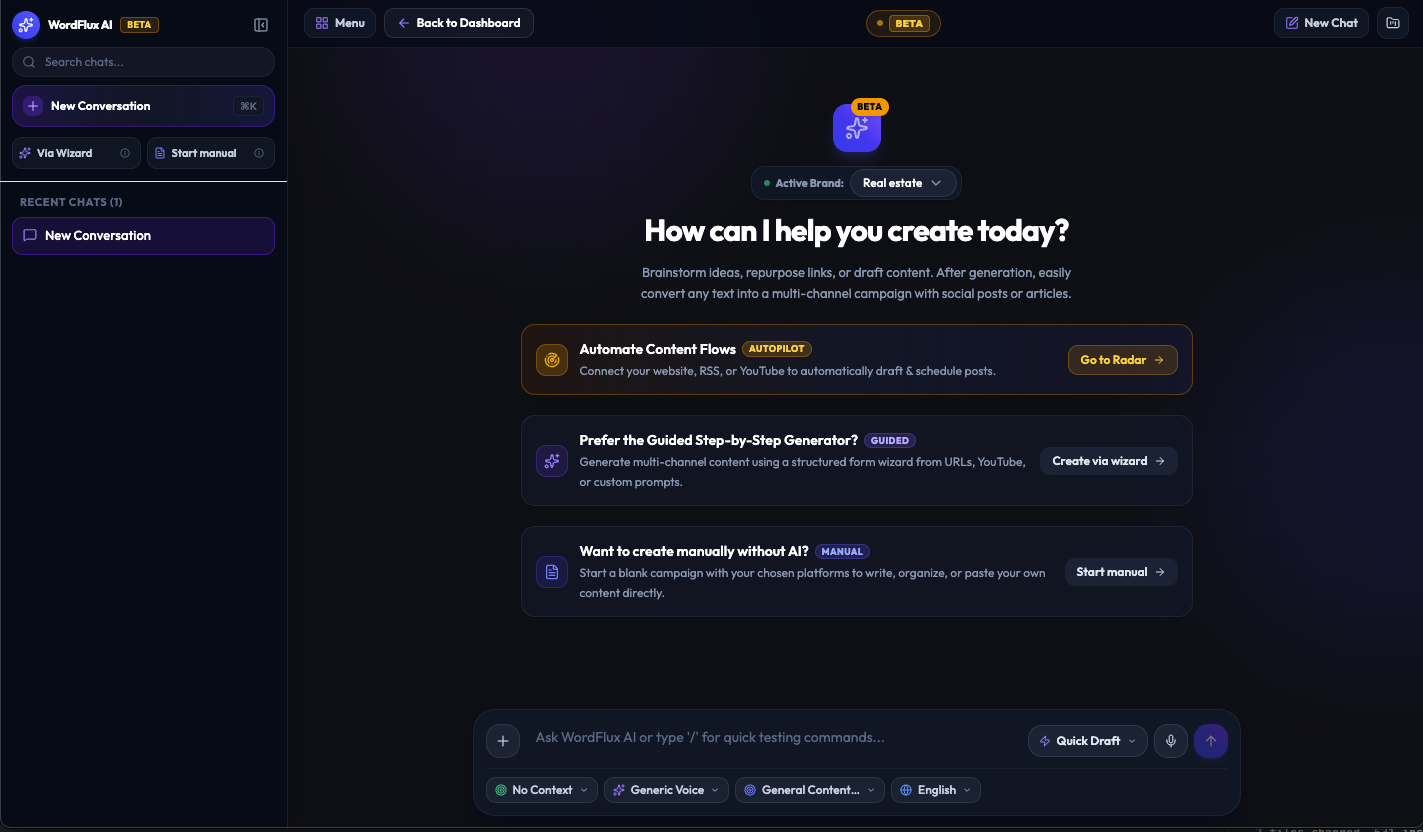
WordFlux AI Chat takes the natural conversational interface of modern AI and integrates it directly into a complete content production, scheduling, and CMS publishing system.
Instead of producing static text in an isolated sandbox, WordFlux AI Chat understands who you are, what channels you publish to, and how your publishing pipeline operates.
How It Works: From Conversation to Published Assets
1. Talk Naturally With Automatic Brand and Context Memory
You can brainstorm, iterate on ideas, ask for strategic angles, or paste rough outlines just like you would in any conversational tool.
WordFlux AI Chat includes:
Brand Voices and Context Profiles: Your company persona, tone, target audience, and style guidelines are applied automatically. You do not need to re-prompt the AI every session.
Dual Speed Engines: Switch between Quick Mode for rapid ideation and Thinking Mode for in-depth strategic research, campaign outlines, and step-by-step reasoning.
2. Multi-Modal Content Ingestion
Drop images, videos, audio recordings, PDFs, or website URLs directly into the chat:
Upload a podcast clip or voice recording to extract key takeaways and social hooks.
Attach an infographic or product screenshot to generate platform-tailored launch posts.
Paste a web link to synthesize an SEO article along with companion social snippets.
3. Interactive Quick-Choice Options and In-Chat Selection Toolbar
Interactive Option Cards: When the AI provides multiple angles or headlines (such as Option A, Option B, or Option C), you can select your preferred option with a single click to expand it.
Selection Toolbar: Highlight any phrase or paragraph in the conversation to rewrite, expand, summarize, or convert that exact snippet into a dedicated asset.
4. One-Click Conversion to Multi-Channel Campaigns
When you click Convert to Campaign:
WordFlux automatically parses the conversation and adapts the copy for more than 10 platforms simultaneously (Blog/CMS, LinkedIn, X/Twitter, Threads, Instagram, Facebook, TikTok, YouTube, Bluesky, Pinterest, and Google Business).
Formatted headings and clean semantic HTML are generated for long-form blog articles.
Clean plain text with platform-appropriate spacing is prepared for social networks.
5. Direct-to-CMS and Automated Scheduling
No copying and pasting between browser windows:
Push directly to your CMS: Send articles straight to WordPress ( Ghost, Webflow, or Shopify coming soon ) as formatted drafts or published posts.
Schedule on Your Calendar: Queue social posts across all your connected accounts right from the workspace.
Generate AI Imagery and Stock Photos: Create matching visuals inside the same dialog without leaving your workflow.
Why a Dedicated Content AI Outperforms a Generalist Chatbot
Feature | Generic Chatbots (ChatGPT / Claude / Gemini) | WordFlux AI Chat |
|---|---|---|
Workflow | Isolated sandbox (requires copy-pasting) | Connected directly to your CMS and social channels |
Brand Voice | Requires repetitive custom prompting | Persistent Brand Voices and Context Profiles |
Multi-Channel Formatting | Must prompt each platform separately | Auto-formats for 10+ social platforms and CMS in 1 click |
CMS Publishing | None (manual formatting required) | Direct integration with WordPress (Ghost, Webflow, coming etc soon) . |
Media and Images | Disconnected image generation | Integrated AI image generator and stock photo selection |
Publishing Calendar | None | Directly schedule onto a multi-channel calendar |
Beta Rolling Out in the Upcoming Days
We are putting the final touches on WordFlux AI Chat, and a public beta will be available in the upcoming days.
Whether you are an individual creator, a marketing agency managing multiple client brand voices, or a content team publishing regularly, WordFlux AI Chat is built to speed up your content workflow from initial idea to live publication.
Getting Started:
Explore the Tool: Access AI Chat in your WordFlux workspace.
Set Up Your Brand Voice: Configure your tone, target audience, and brand rules under Brand Voices so your chat is personalized from the start.
Share Your Feedback: We welcome your suggestions and feature requests during the beta phase.
Join the conversation
"Sound familiar? Open AI chat. Type out your context. Copy post to LinkedIn. Re-prompt for Twitter. Copy again. Adjust formatting. Open scheduler. Repeat for every single idea😟 We’re launching the W..."